Phone and email
One order rarely fits into one call. They ring to ask, ring back to change the guest count, ring again about the date.
Free WordPress catering plugin
Take catering orders while you sleep. An inquiry at eleven at night is a missed call for everyone else. Euqin takes it as an order. Turn your WordPress site into a complete catering ordering system in an afternoon. Free, no code, no commission, no monthly fee.
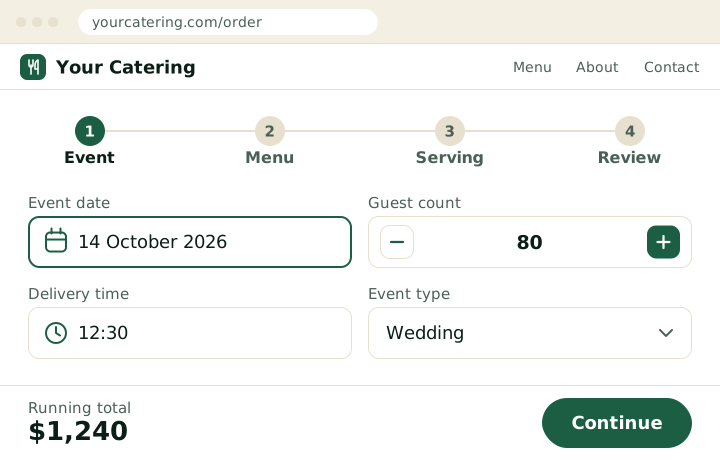
New catering request
Wedding · 14 Oct · 80 guests · $1,240
The problem
One order rarely fits into one call. They ring to ask, ring back to change the guest count, ring again about the date.
A form collects a message. A form cannot price a menu, count guests, or check whether you can still take the date.
A national platform takes that order in a minute. Yours takes three phone calls and a wait.
You are not losing on the food. WooCommerce checkout will not fix it either. It was built for shipping parcels: no guest count, no event date, no way to quote before the customer pays.
Live demo
A real order flow, not a slideshow. Send a test request, then open the admin and see what your kitchen receives.
The live wizard
How it works
A phone call gives you a conversation. A contact form gives you a paragraph. A catering ordering system gives you the event date, the guest count, the menu and the delivery. Priced, structured and ready for the kitchen.

Date, delivery time, guest count and occasion, checked against your notice period before a dish is chosen.

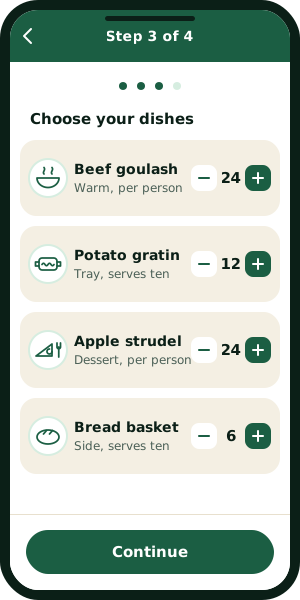
Your dishes, grouped the way you plan a menu. Unlimited items, with a minimum quantity per group.
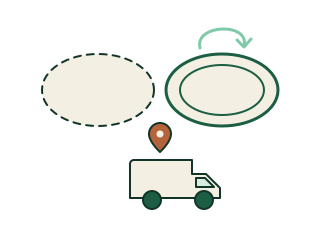
Serving style and delivery, priced as they choose, with the running total updating on both sides.

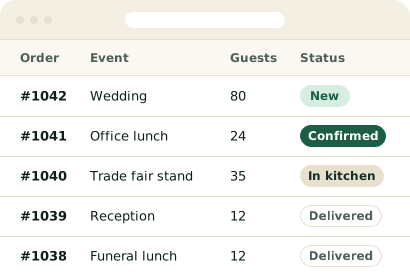
The whole order on one screen with allergy notes, sent as a request rather than a payment.
Features
Who it’s for
Four kinds of catering business, one ordering system, and the same four screens for all of them.
Most catering inquiries arrive as one vague line: can you do eighty people on the fourteenth? A catering ordering system turns that line into a complete booking. The date, the venue, the guest count and the serving style are all answered before it reaches you. You price the wedding or the trade fair stand the same day.
Office managers place their catering order between two meetings, and they rarely call back to fill in what they left out. An online catering order form asks for the delivery window, the headcount and the dietary notes while they are still ordering. Your kitchen gets a complete order. Next Thursday’s lunch takes them about a minute to repeat.
A wedding gets booked in March for a date in September, and the guest count moves at least twice in between. A catering booking system holds the whole job in one record. A change in numbers or serving style updates that order, instead of starting another email thread. You always know which version is the real one.
A restaurant that also caters is running two businesses out of one kitchen. Euqin is a WooCommerce catering plugin, so your catering menu stays apart from the dine-in menu in the same store. Catering carries its own lead time and its own minimum order. Party trays stop arriving in the middle of a busy Saturday service.
Built for phones
A catering inquiry often starts on a phone, in a taxi or between two meetings. The Euqin ordering wizard is built for a thumb from the first tap to the last, with no pinching and no sideways scrolling. The date picker, the guest count stepper and the dish cards all work one-handed. Your customer finishes the catering order without moving to a laptop.
Case study · Hamburg
Three inboxes, one telephone line and a notebook. Catering orders reached the D’Agate kitchen in Hamburg that way until 2025. The ordering wizard replaced all three.
“We have been feeding Hamburg since 1962, and until last year every order still came down a telephone line. Three calls for one wedding. Now the order arrives with the date, the guest count and the menu already on it, and I read it once instead of writing it down twice.”
PK
Prem Kumar Kapoor
founder, D’Agate, Hamburg, September 2026
| Before the wizard | With Euqin | |
|---|---|---|
| Where orders arrive | Phone and three inboxes | One order list |
| Guest count | Asked on a second call | On the order |
| Menu choices | Written down twice | Priced in the wizard |
| Delivery date | Confirmed by phone | Set by the customer |
163
guests booked in two weeks, without a phone call
64
years of catering in Hamburg, now ordered online
From the six catering requests placed between 10 and 25 September 2026.
Do the math
3 min
in the wizard, and none of it yours
The same order by telephone costs an ask, a call back and a confirmation, spread across three days.
$149
a year, for Pro
Think what one average catering order is worth to you. Pro costs less than that, once. The free version costs nothing.
$0
Forever, not a trial.
Most popular
$149
per year
about $12 a month, billed once a year
A separate plugin that adds five modules.
Everything in Free, plus
One license covers one website. Renews yearly, cancel any time.
Every price on this page is what you pay. No setup fee on Free or Pro, no per-order commission, and no charge that appears later.
FAQ
Install Euqin, group your dishes in the Menu Builder, and drop the ordering wizard onto any page with a shortcode. Customers pick an event date, build their menu, choose serving and delivery, and send a request. Every request lands in your dashboard with the details already structured, so you can confirm it in a few clicks.
Yes. Euqin is built on WooCommerce and uses your existing products, categories, and tax classes. Your dishes stay WooCommerce products. Euqin replaces the checkout flow with a catering wizard, not your product data. Nothing needs to be migrated, and the rest of your store keeps working exactly as it does now.
Yes. Euqin uses a request-first model: customers send a non-binding order request, you review it, and you confirm the final price before any money changes hands. The flow matches how catering has always worked, where availability and price get agreed first.
Yes. The free plugin includes the full four-step wizard, unlimited dishes and orders, menu groups, occasions, serving options, pickup and delivery with a postcode area, lead-time rules, catering order statuses, emails, the order dashboard, and English and German. Pro adds catalog view with photos, kitchen print sheets, PDF invoices, delivery zones each with a fee, minimum order size, and priority support, for $149 a year. The free version is a complete ordering system, not a trial.
Yes. The Review step includes a notes field where customers can list allergies, intolerances, and dietary requirements before they send the request. Those notes travel with the order into your dashboard, and Pro can print them on the kitchen sheet, so the information reaches the person cooking rather than sitting in an inbox.
Yes. Euqin inherits your theme’s fonts and gives you four brand colors: main, accent, success, and button text. You also set one corner radius, applied to buttons, cards, and panels. No custom CSS is required. The wizard adapts to your existing page width instead of forcing its own layout.
Every order and customer record stays in your own WordPress database, and the free plugin makes no calls to any outside service. Euqin tracks neither you nor your customers. Euqin also asks you to nominate your privacy policy and terms pages, and customers must accept your terms before a request can be submitted.
The wizard is built with keyboard navigation and screen-reader support, so a customer who cannot use a mouse can work through an order from start to finish. Accessibility shaped the design rather than being added at the end. I run an accessibility practice alongside Euqin. If you find something that does not work, email me and I will fix it.
Yes. Offer pickup, delivery, or both, each with its own fee and its own WooCommerce tax class, set from the Euqin settings. The free version limits delivery to the postcodes you actually serve, lets you turn requests from outside that area on or off, and shows your own message to addresses outside it. Pro adds a different price per zone. Customers choose in the Extra step and the total updates immediately.
Yes. Euqin uses two lead-time thresholds. Orders placed inside your normal notice period arrive flagged as urgent so you can deal with them first, and orders placed inside your minimum are not accepted at all. The customer sees your phone number and your own message instead, so an urgent job becomes a call rather than a lost order.
Yes. Your customer gets a confirmation when the request arrives and an update whenever the order status changes: confirmed, paid, delivered, cancelled. You get the request the moment it is sent. Replying to that email goes straight to the customer, so a question never needs the dashboard open.
The answer depends on what you need. If you want customers to order catering directly on your own WordPress site, with event dates, guest counts, grouped menus, serving options, and a quote-first flow, Euqin is built specifically for that. If you only need a simple inquiry message, a general form plugin will do the job.
See the demo, install the free version, and watch the first request arrive.
