Features
Built for caterers. Not adapted from a shopping cart.
Euqin turns your WordPress site into a working catering order system: a four-step ordering wizard for your customers, and eight admin screens where you set the rules. Unlimited dishes, unlimited orders, and a free version that is not a trial. Every feature on this page exists because a caterer in Hamburg needed it and no plugin did it.
Why a separate system
A catering order is not a shopping cart.
A shopping cart asks for a card number. A catering order asks for a date, a guest count, a serving style, and a price the kitchen agrees to before anyone pays. Euqin is built around the second set of questions.
| A WooCommerce checkout asks for | A catering order needs |
|---|---|
| A shipping address | A delivery address, a date, and a time window |
| A quantity | A guest count, and a minimum quantity per dish group |
| Card payment now | A quote the caterer confirms first |
| Nothing else | Whether the platters come back afterwards |
Even the order statuses are different. A parcel is processing, shipped, completed. A catering order is a new request, then confirmed, then paid, then delivered. Euqin ships that flow rather than bending the other one around it.
What your customers see
An ordering wizard that asks the right questions.
Your customer meets four screens, each asking one kind of question. Nobody faces a forty-field form on a phone, and nothing gets asked twice.
Four guided steps
Event, Menu, Extras, Review. Event details come first, so the wizard can check the date against your lead-time rules before your customer spends ten minutes choosing food you cannot deliver that day.
A quick start on your homepage
Drop the mini form onto your front page and customers enter the date, time and guest count right there. Those answers travel into the full ordering wizard already filled in, so the first step is done before the page has even changed.
A running total
The price updates with every selection: dishes, serving option, delivery. Your customer and your kitchen are looking at the same number the whole way through, on desktop and on a phone.
Menu groups they can browse
Starters, platters, warm mains, desserts. Customers open one group at a time instead of scrolling past ninety products in a single list. Put your entire menu in. There is no limit on dishes, in the free version either.
Occasions, not categories
Weddings, birthdays, office lunches, funerals, receptions, or whatever your kitchen actually gets asked for. You write the list.
Serving options in plain words
Disposable platters, porcelain you collect afterwards, or porcelain the customer returns. Each option carries the name, the explanation and the fee you wrote yourself.
A notes field for allergies
The review screen takes allergies, intolerances and dietary requirements in the customer’s own words, and those notes travel with the order into your dashboard.
English, German, or your own language
Euqin ships with both languages and uses standard WordPress translation files, so any language can be added without touching the code.
Keyboard and screen-reader support
A customer who cannot use a mouse can work through an entire order from the first field to the submitted request.
A request, not a checkout
No card field, no forced payment. Your customer sends a request and gets a confirmation email that says what happens next.
Built for the phone
Most orders finish in about three minutes.
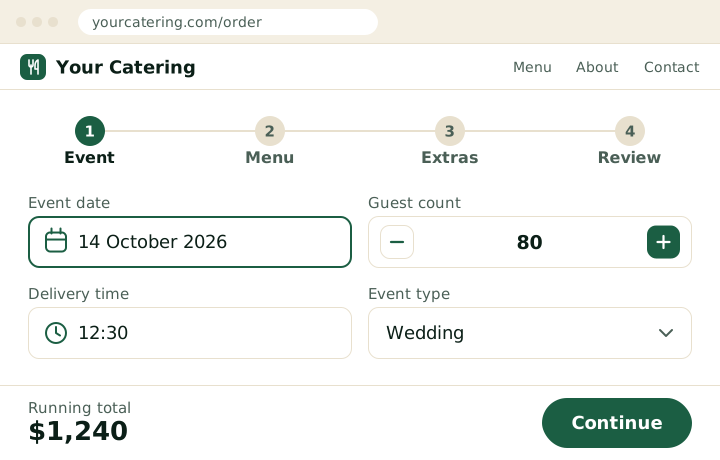
Step one of the ordering wizard, on the caterer’s own site.
What your kitchen gets
Orders that arrive ready to cook from.
Every request lands in one place with its details already structured. Nothing gets retyped from an email, and nothing gets read out over a phone line into a wet notebook.
The event date and guest count, right in the orders list
Open WooCommerce orders and two extra columns are already there. You can see which Saturday has fifty guests without opening a single order.
Catering order statuses
New request, confirmed, paid, delivered, cancelled. Written for how a catering job actually moves, so a glance at the list tells you what still needs a decision.
Emails at every step, both directions
Your customer gets a confirmation and an update at each change of status. You get the request the moment it arrives. Reply to that email and your message goes straight to the customer, with no copying an address out of the dashboard.
Printable kitchen sheets
Print what the kitchen needs and leave out what it does not. You choose which fields appear, so the pass gets dishes and quantities rather than a two-page invoice.
Two lead-time thresholds
Set the notice period you prefer and the minimum you will accept. Orders inside the first arrive flagged urgent. Orders inside the second are not accepted at all.
An urgent-contact number
A customer who leaves it too late sees your phone number instead of a rejection, and you get an urgent alert. The job becomes a phone call you can decide about, not a lost order you never hear of.
Allergy notes where the cook will see them
Dietary notes travel with the order and can be printed on the kitchen sheet, rather than sitting in an inbox.
PDF invoices
Generate the invoice when the order is finalized and send it automatically. Catering gets invoiced at delivery, and Euqin follows that order of events rather than fighting it.
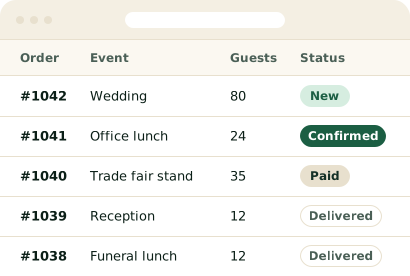
The orders list, with event type, guest count and catering statuses.
What you control
Your rules, your prices, your database.
Every rule a caterer normally explains on the phone is a setting in Euqin. Set it once and the wizard enforces it on every order after that.
Menu Builder on top of WooCommerce
Build dish groups from the WooCommerce categories you already have, or pick individual products. Your dishes stay WooCommerce products, with your prices and your tax classes intact, and there is no cap on how many.
Minimum quantities per group
Set a floor where plating makes it sensible, ten desserts rather than five, on any group you like. Free.
Minimum order size
Stop a $40 request arriving for a fifty-guest event.
Pickup, delivery and a postcode area
Offer pickup, delivery or both, each with its own fee and its own tax class. Then list the postcodes you serve and decide what happens when someone outside them tries to order: refuse the request, or accept it anyway. Either way the customer reads your message, not a generic error. The postcode area is in the free version.
Delivery zones with a fee each
Charge a different price per area once one flat delivery fee stops reflecting the drive.
Serving options you name, price and tax
Three come set up, Disposable, Collection and Return, and every label, description, fee and tax class is yours to change. Rename them, reprice them, or delete the one you do not offer.
Four brand colors and one corner radius
Set the main color, the accent, the success color and the button text color, plus one corner radius applied across buttons, cards and panels. No custom CSS, and the wizard inherits your theme’s fonts.
Catalog view
The whole menu, with photos, on a single page for customers who want to see everything before choosing.
Your data stays yours, and stays put
Orders, menus and customer records sit in your own WordPress database. The free plugin makes no calls to any outside service and tracks neither you nor your customers. No commission, no monthly platform fee, and nothing to export if you ever change your mind.
Under the hood
Eight admin screens. Nothing you have to code.
Euqin adds one menu to your WordPress admin. Each screen holds one kind of decision, so setting the plugin up is a sequence rather than a hunt.
| Module | What it is for |
|---|---|
| Dashboard | Where every screen is listed, with its status |
| Menu Builder | Choose which dishes appear in the ordering wizard. Group them into sections like Starters or Desserts. |
| Order Setup | Set up your event types and serving styles |
| Delivery & Pickup | Set what delivery and pickup cost. Limit your delivery area by postcode. |
| Lead Time | Set how much time you need before an event. Flag urgent requests so you can act fast. |
| Design | Set the colors and corner radius customers see in the ordering wizard. |
| Settings | Your business details, shop page, and data tools |
| Add-ons | What Euqin Pro adds |
All eight are in the free plugin. Euqin Pro is a separate plugin, and installing it adds its own screen for the kitchen print sheet. Nothing is hidden behind a license check inside the free download. The code for the paid modules is not in it at all.
Placement
Shortcodes, and nothing to rebuild.
- The full ordering wizard. Drop
[euqin_event_planner]onto any page, in any builder, in any theme. The wizard takes your page width instead of imposing its own layout. - The quick-start form. Add
[euqin_quick_start]to your homepage or any landing page. Date, time and guest count are collected there, then carried into the full wizard. - Ordering straight from your shop pages. An Add to Selection button on your product pages lets customers collect dishes while they browse, then open the wizard with their menu already started.
- Scripts load only where the wizard runs. Pages without a Euqin shortcode load nothing from Euqin, so the rest of your site keeps the page speed it has now.
- Works with High Performance Order Storage. Euqin is HPOS-compatible, which means it uses WooCommerce’s current order tables rather than the older post-based storage. Large order volumes stay fast.
The honest part
What Euqin does not do.
Euqin is an ordering system, not a back-office suite. Euqin does not handle staff scheduling, inventory, food costing, accounting, point of sale, or banquet event orders. Euqin takes the order accurately on your own website and hands it to whatever you already use for the rest.
- No staff scheduling or shift planning
- No inventory or food-cost tracking
- No accounting or bookkeeping, PDF invoices only, and only in Pro
- No point of sale and no table service
- No sales pipeline, proposal builder or contract signing
- No production planning for a large kitchen
- No structured allergen database. A free-text notes field today, structured allergens on the roadmap
- No payment at order time, by design rather than by omission
- Not for restaurant takeaway. Euqin is built for scheduled events with guest counts and quotes, not for same-day food delivery
Already running something bigger?
Euqin takes the order. Production software cooks it. If your kitchen already runs planning or production software, Euqin sits in front of it, on your own website where the order comes in, rather than asking you to replace anything.
If you need a full suite, buy one.
A full catering management suite does far more than this: event booking, banquet event orders, contracts, proposals, CRM, floor plans, production planning. Worth knowing before you call them: not one of them publishes a price. Every inquiry starts with a demo request. Euqin does one thing, and the price is on the pricing page.
What costs money
The ordering system is free. One plugin adds five modules.
| Euqin Pro adds | What it does |
|---|---|
| Catalog view | The whole menu, with photos, on one page |
| Kitchen print sheets | Printable sheets with the fields you choose |
| PDF invoices | Sent to the customer automatically |
| Delivery zones | A different delivery fee for each area |
| Minimum order size | A floor before a request can be sent |
Everything else on this page is in the free plugin: the full four-step wizard, the quick-start form, unlimited dishes and orders, menu groups and their minimums, occasions, serving options, pickup and delivery, a postcode delivery area, lead-time rules, catering order statuses, emails at every step, both languages and the order dashboard. Pro is $149 a year.
Before you install
- WordPress 6.5 or newer
- WooCommerce, installed and active, works with High Performance Order Storage
- PHP 8.0 or newer
- Any theme and any page builder
- A terms page and a privacy policy page, nominated in Settings
- English and German included, every customer-facing label editable
FAQ
Questions about features
What features does a catering order system need?
A catering order system needs six things a shopping cart does not have: an event date with lead-time rules, a guest count, grouped menus with minimum quantities, serving and delivery options with their own fees, a running total, and a request step that ends in a quote rather than a payment. Euqin covers all six in one WordPress plugin.
Can I use my existing WooCommerce products?
Yes. The Menu Builder draws on the WooCommerce categories and products already on your site, keeping your prices, images and tax classes as they are. Nothing needs migrating, no dishes get duplicated, and the rest of your store keeps working exactly as it does now.
Can I limit catering delivery to my own area?
Yes, and the free version does it. List the postcodes you deliver to, then choose what happens when an address falls outside them: refuse the request, or take it anyway. Either way the customer reads a message you wrote. Pro adds a different delivery fee for each zone.
Is Euqin available in German?
Yes. Euqin ships with a German translation covering the whole ordering wizard, and uses standard WordPress translation files, so any other language can be added without touching the code. Every label is editable as well, which matters because caterers in Hamburg and Vienna do not always use the same words.
Can I put a short order form on my homepage?
Yes. The quick-start form takes the event date, time and guest count on any page, then carries those answers into the full ordering wizard. Visitors start the order where they land instead of clicking through to a separate page first, and the first step is already complete when they arrive.
Which features are in the free version of Euqin?
The free plugin includes the complete four-step ordering wizard, the quick-start form, unlimited dishes and orders, menu groups with minimum quantities, occasions, serving options, pickup and delivery, a postcode delivery area, lead-time rules, catering order statuses, emails and the order dashboard. Euqin Pro adds five modules for $149 a year.
Can I change what the serving options are called?
Yes. Euqin ships three serving options in English, Disposable, Collection and Return, and every part of each one is editable. Change the label, rewrite the description your customers read, set your own fee, and assign the tax class that applies. Delete any option you do not offer.
Does Euqin replace catering management software?
No. Euqin replaces the ordering part: the phone calls, the contact form, the retyping. Euqin does not do staff scheduling, inventory, food costing, accounting or point of sale, so a caterer who needs those will keep using the tool that provides them. What changes is where the order comes in.
Can I put the ordering wizard on more than one page?
Yes. The wizard shortcode works on any number of pages, in any page builder. Some caterers run one wizard page. Others run a separate page per line of business, such as office catering and weddings, and link to each from the relevant part of the site.
Reading about features is slower than using them.
Open the demo, build a menu, and send yourself a test request. Nothing to install and nothing to sign up for.
- Free version available. No credit card.