Why groups beat one long list
A catering customer ordering for forty guests is not browsing. Groups let someone choose two starters, one platter and a dessert without reading past every product in your shop. Grouping also carries rules that only make sense per course, such as a minimum quantity.
Build a group from a WooCommerce category
Go to Euqin → Menu Builder and click Add Group.
Name the group the way a customer would say it, for example Starters.
Choose From category and pick the WooCommerce category holding those products.
Every product in that category appears inside the group.
Build a group from individual products
Click Add Group and name it.
Search for each dish by name and add it to the group.
| Method | Use it when |
|---|
| From category | Your shop categories already match the courses you serve. |
|---|
| From products | The dishes you want sit across several categories, or only part of a category belongs on your catering menu. |
|---|
Order the groups the way the customer sees them
Drag the groups in Menu Builder into the order you want. A customer meets them from top to bottom in that order, so the course you most want ordered goes first.
Set a minimum quantity per group
Open a group and enter a minimum quantity. Ten desserts is a common floor, because plating five is not worth the kitchen time it costs. A customer who picks fewer sees the minimum while ordering, rather than afterwards in a phone call.
What the customer sees
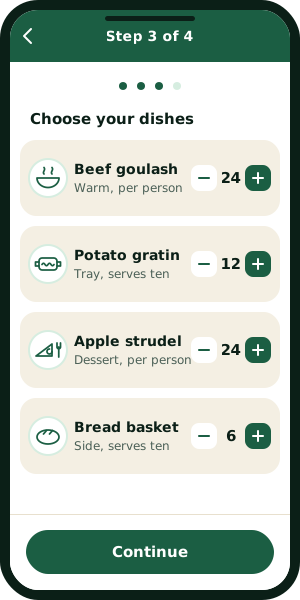
Your groups become the dishes step of the ordering wizard. A customer sees each group as a heading with its dishes beneath it, and any group carrying a minimum shows that minimum in place.
What to do next
Serving options, delivery and lead time are the three rules that finish a working menu. Each one gets its own guide, and the documentation hub lists them as they ship.
Troubleshooting
The product is unpublished, out of stock, or not in the category the group uses. Check the product in WooCommerce first.
The group is empty or was never saved. Open it in Menu Builder and confirm it holds at least one product.
Euqin shows the WooCommerce price for that product, so changing the price means changing the product.
Open a support ticket with your WordPress version, your PHP version and what you saw on screen. A reply arrives within 24 hours.